Check Your Financial Aid Status
Students are responsible for monitoring their financial aid status through the Self-Service portal. Within the portal, they can review their satisfactory academic progress, estimated cost of attendance, financial aid offer, and any outstanding requirements, if applicable.
How to Access the Financial Aid Section in Self-Service:
- Sign in through myFAU using your FAU credentials.
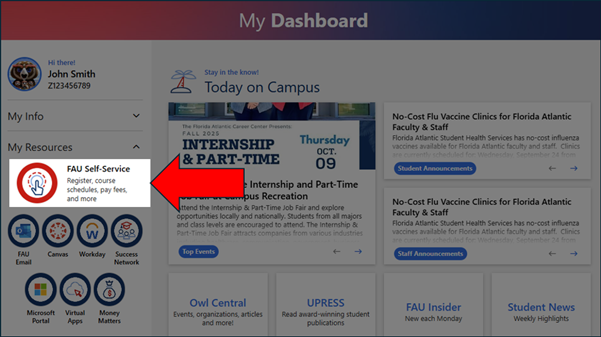
- Select FAU Self-Service.
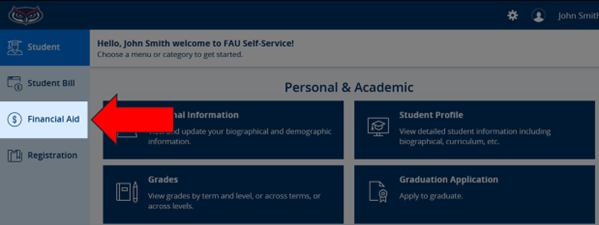
- Select Financial Aid from the Menu Options.
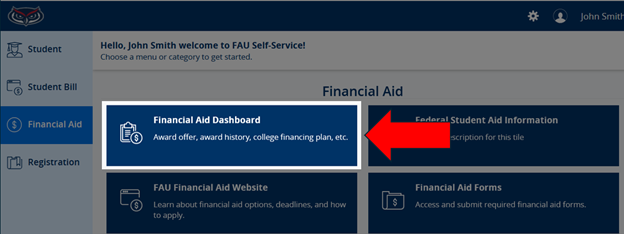
- Select Financial Aid Dashboard.
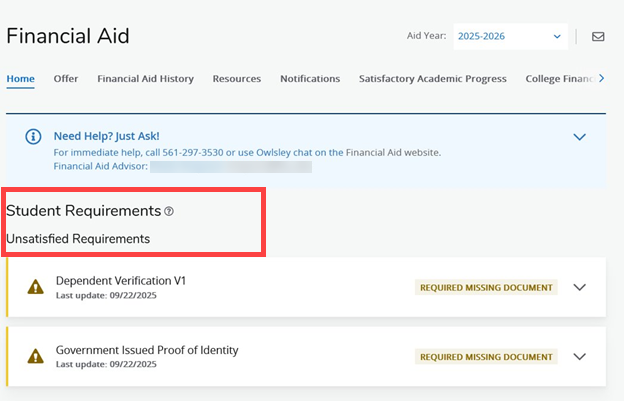
- On the Home screen, you'll find details about any missing requirements or actions you need to take, along with menu options to view/accept your offer, academic progress, and other important information.
If you have any questions, contact us for assistance.
For steps on reviewing and accepting your financial aid, please view Accepting Financial Aid Offers
IMPORTANT NOTES:
- Most types of gift aid, such as scholarships and grants, are already marked as accepted. However, student loans are in offered status and require you to either accept or decline them. If you’re enrolled for both Fall and Spring semesters, any accepted loan will be automatically split between the two terms.
- Financial aid funds are disbursed after the drop/add deadline, typically during the second or third week of the semester. These funds are applied directly to your FAU account balance.
- Students with accepted financial aid by the end of add/drop week have a deferred payment deadline for any remaining balance. If your financial aid exceeds your charges, the remaining amount will be issued to you as a refund.