From Lab Desktop to Phone: Automated Quality Control for Gait Video Using 3D Pose Estimation and Large Language Models

Automated QC for Clinical Gait Videos
Roger Tawfik
Home Institution: University of Massachusetts Amherst
REU Mentor: Behnaz Ghoraani, Ph.D.
REU Co-Mentors: John Forde, Ph.D. Candidate, Mahmoud Seifallahi, Ph.D. Candidate
Overview
- Goal: compute accurate gait metrics through 3D Human Pose Estimation
- Why It Matters: gait metrics can reveal early signs of Alzheimer's disease and related dementias
- Problem: pose estimation is only as good as the video it receives
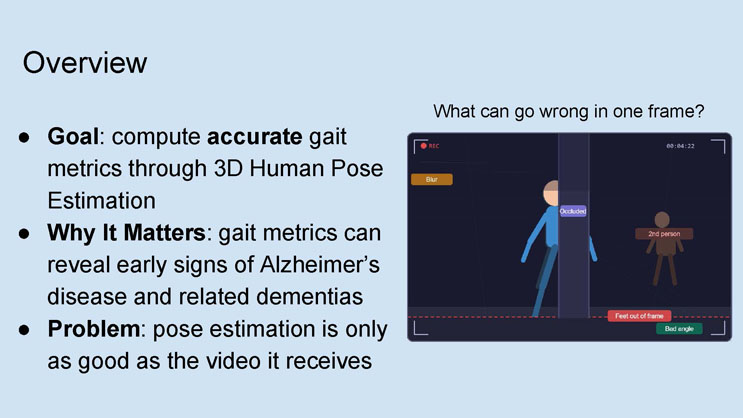
Caption: "What can go wrong in one frame?"
Diagram description: A mock video recording frame shows a walking figure with several quality-control problem labels attached: "Blur" in the upper left, "Occluded" on the walking figure where a pillar blocks part of their body, "2nd person" labeling a second figure in the background, "Feet out of frame" near the bottom where a dashed red line marks the frame boundary, and "Bad angle" in the bottom right corner. The frame also displays a recording indicator ("REC") and a timestamp reading 00:04:22.
The Gap: Nothing rejects an unusable video before analysis
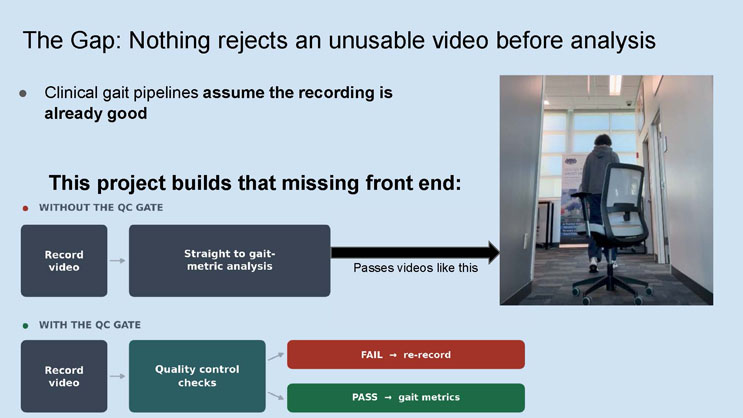
- Clinical gait pipelines assume the recording is already good
This project builds that missing front end:
WITHOUT THE QC GATE: Record video → Straight to gait-metric analysis → (arrow labeled "Passes videos like this") pointing to a photograph of a person walking away from the camera down a hallway, with an office chair partially blocking the view in the foreground.
WITH THE QC GATE: Record video → Quality control checks → branches to either "FAIL → re-record" or "PASS → gait metrics".
The System: What the pipeline does
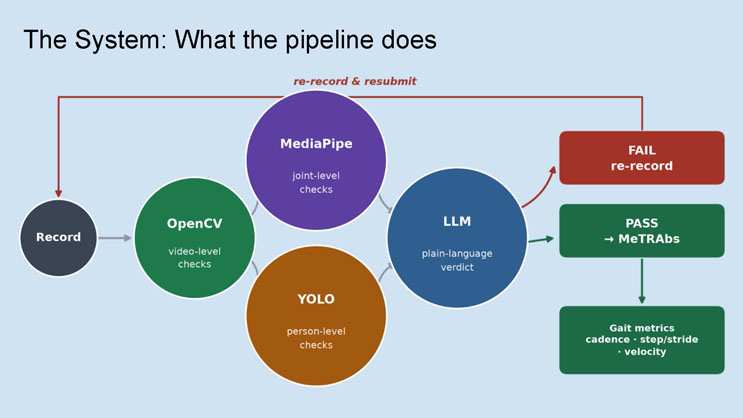
Diagram description: A flowchart of circular and rectangular nodes. Starting at "Record", an arrow leads to "OpenCV" (video-level checks). From OpenCV, arrows lead to two parallel nodes: "MediaPipe" (joint-level checks) and "YOLO" (person-level checks). Both feed into "LLM" (plain-language verdict). From the LLM node, one path leads to a red box labeled "FAIL, re-record", which loops back with an arrow labeled "re-record & resubmit" to the "Record" node at the start. The other path leads to a green box labeled "PASS → MeTRAbs", which continues down to a final green box labeled "Gait metrics: cadence, step/stride, velocity".
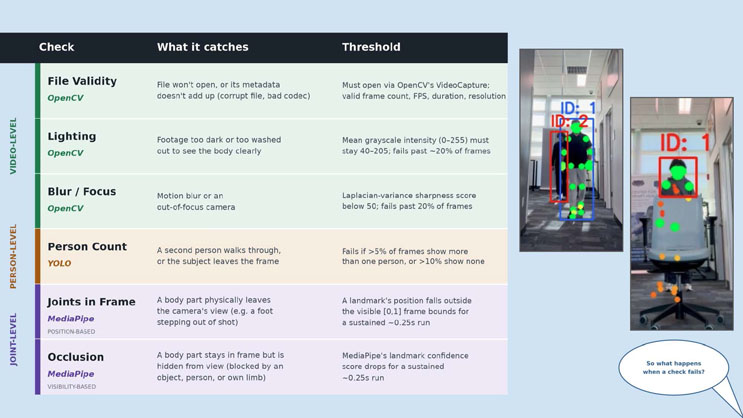
| Level | Check | Tool | What it catches | Threshold |
|---|---|---|---|---|
| Video-level | File Validity | OpenCV | File won't open, or its metadata doesn't add up (corrupt file, bad codec) | Must open via OpenCV's VideoCapture; valid frame count, FPS, duration, resolution |
| Video-level | Lighting | OpenCV | Footage too dark or too washed out to see the body clearly | Mean grayscale intensity (0-255) must stay 40-205; fails past ~20% of frames |
| Video-level | Blur / Focus | OpenCV | Motion blur or an out-of-focus camera | Laplacian-variance sharpness score below 50; fails past 20% of frames |
| Person-level | Person Count | YOLO | A second person walks through, or the subject leaves the frame | Fails if >5% of frames show more than one person, or >10% show none |
| Joint-level (position-based) | Joints in Frame | MediaPipe | A body part physically leaves the camera's view (e.g. a foot stepping out of shot) | A landmark's position falls outside the visible [0,1] frame bounds for a sustained ~0.25s run |
| Joint-level (visibility-based) | Occlusion | MediaPipe | A body part stays in frame but is hidden from view (blocked by an object, person, or own limb) | MediaPipe's landmark confidence score drops for a sustained ~0.25s run |
Adjacent images: Two annotated photographs. The first shows a hallway scene with two tracked people, each surrounded by a colored bounding box labeled "ID: 1" and "ID: 2", with green and orange dots marking detected body joint landmarks. The second shows a close-up of a person sitting in an office chair, labeled "ID: 1" with a red bounding box and green/orange joint landmark dots overlaid on the visible parts of their body.
A speech bubble asks: "So what happens when a check fails?"
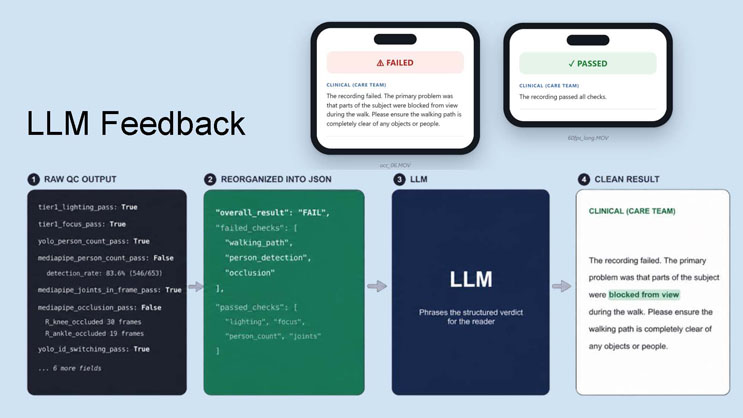
LLM Feedback
Example result card (failed): Title "FAILED". Label "CLINICAL (CARE TEAM)". Text: "The recording failed. The primary problem was that parts of the subject were blocked from view during the walk. Please ensure the walking path is completely clear of any objects or people." File name shown: occ_06.MOV
Example result card (passed): Title "PASSED". Label "CLINICAL (CARE TEAM)". Text: "The recording passed all checks." File name shown: 60fps_long.MOV
Four-step process diagram:
- Raw QC output: a list of technical results, including tier1_lighting_pass: True; tier1_focus_pass: True; yolo_person_count_pass: True; mediapipe_person_count_pass: False; detection_rate: 83.6% (546/653); mediapipe_joints_in_frame_pass: True; mediapipe_occlusion_pass: False, with R_knee_occluded 30 frames and R_ankle_occluded 19 frames; yolo_id_switching_pass: True; and a note "...6 more fields".
- Reorganized into JSON: a structured object showing "overall_result": "FAIL", "failed_checks": ["walking_path", "person_detection", "occlusion"], and "passed_checks": ["lighting", "focus", "person_count", "joints"].
- LLM: described as phrasing the structured verdict for the reader.
- Clean result: the final plain-language output shown under the heading "CLINICAL (CARE TEAM)": "The recording failed. The primary problem was that parts of the subject were blocked from view during the walk. Please ensure the walking path is completely clear of any objects or people." (with the phrase "blocked from view" highlighted).

Mobile Integration
Flow diagram: "Desktop Pipeline" (validated reference implementation) leads down to "Tested against one shared clip set", which branches into three outcome categories: "CONFIDENT PASS", "MARGINAL", and "CONFIDENT FAIL", with a note "iOS and Android decode differently*". This leads down to two parallel boxes: "Android" (Kotlin, full native re-implementation, real device) and "iOS" (Swift, full native re-implementation, real iPhone hardware). Both converge into a final box: "Same verdict as desktop, on both platforms, on real hardware".
Screenshot 1 (GaitQC app, pass result): Header "GaitQC — On-device gait video quality check". Buttons "Record gait video" and "Upload from library". Result banner (green): "Recording passed — This recording met all quality checks." Expandable "Hide technical details" section reads: "Frames decoded: 267 | Pose detected: 267 | Elapsed: 25312ms | ~10.5 fps. QC: passed_qc (tier0=true tier1=true stage2=true)".
Screenshot 2 (GaitQC app, fail result): Header "GaitQC — On-device gait video quality check". Buttons "RECORD GAIT VIDEO" and "UPLOAD FROM LIBRARY". Result banner (red): "Please re-record this video — Something blocked the subject's legs for part of the walk. Please re-record with a clear, unobstructed path." Expanded "HIDE TECHNICAL DETAILS" section lists: "Frames decoded: 654 | Pose detected: 571 | Elapsed QC: failed_tier2 (tier0=true tier1=true stage2=true). FAILED: tier2_mediapipe.joints_in_frame: L_hip. FAILED: tier2_mediapipe.occlusion: L_hip: 0; #. FAILED: tier2_yolo.yolo_person_count: subject. FAILED: tier2_yolo.orientation: path weaves /. Note (diagnostic, does not affect verdict): tier2_mediapipe.centering: median_pelvis_x; tier2_yolo.yolo_id_switching: primary ID: 2." A "SHARE BENCHMARK LOG" button appears below, along with a "DEVELOPER" section listing test entries "TEST: OCC_06 (FAIL CASE)" and "TEST: PC PASS CASE (PASS CASE)".
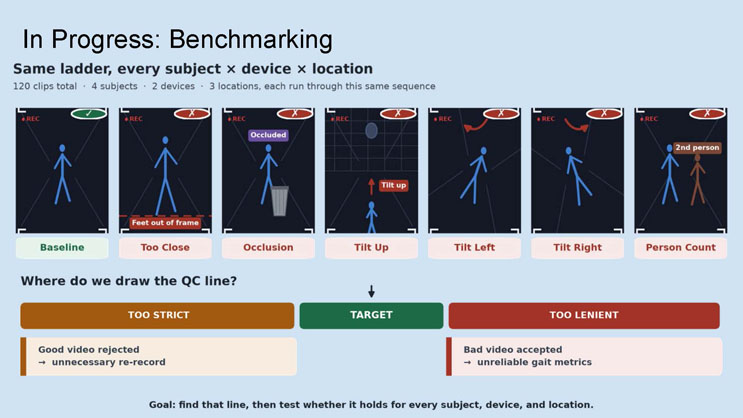
In Progress: Benchmarking
Same ladder, every subject × device × location
120 clips total · 4 subjects · 2 devices · 3 locations, each run through this same sequence
Seven illustrated video-frame examples, each marked pass (checkmark) or fail (X):
- Baseline (pass): a simple walking stick figure with no issues flagged.
- Too Close (fail): stick figure with a "Feet out of frame" label and a dashed red line marking the frame boundary near the feet.
- Occlusion (fail): stick figure labeled "Occluded" with a trash can icon blocking part of the body.
- Tilt Up (fail): a small distant stick figure with an oval shape above and an arrow labeled "Tilt up" showing the camera angled upward, against a grid floor.
- Tilt Left (fail): stick figure on a grid floor with a curved red arrow indicating the camera tilting left.
- Tilt Right (fail): stick figure on a grid floor with a curved red arrow indicating the camera tilting right.
- Person Count (fail): two stick figures in frame, with the second labeled "2nd person".
Where do we draw the QC line? A horizontal bar chart with three sections from left to right: "TOO STRICT" (orange, subtext: "Good video rejected → unnecessary re-record"), "TARGET" (green, center, no subtext), and "TOO LENIENT" (red, subtext: "Bad video accepted → unreliable gait metrics"). An arrow points down to the "TARGET" section from above.
Goal: find that line, then test whether it holds for every subject, device, and location.
This work was supported through the NSF REU Site in Sensing and Smart Systems, funded through NSF Award CNS-2447437
End of Presentation
Click the right arrow to return to the beginning of the slide show.
For a downloadable version of this presentation, email: I-SENSE@FAU.