Primary Navigation
For each college, and for Research
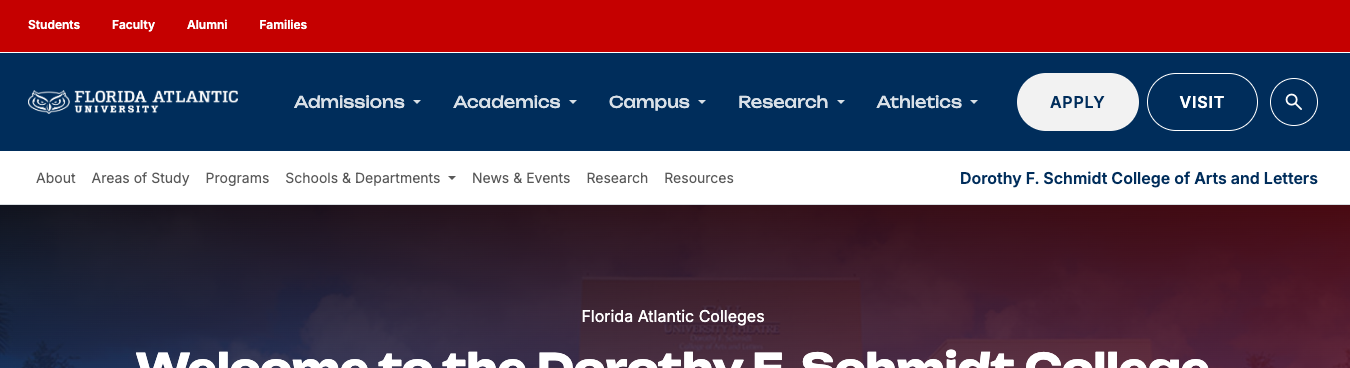
Strategic Rationale: Standardized Navigation Across FAU Colleges
At Florida Atlantic University, our digital footprint across our 10 colleges and the Division of Research serves as the front door for prospective students, faculty, researchers, and community partners. Moving away from the decentralized approach—where individual colleges maintained independent navigation structures—to a unified primary navigation model is a deliberate strategic step toward strengthening FAU’s enterprise web presence.
Establishing a consistent top-level navigation framework across all college properties achieves four critical objectives:
-
User-Centric Architecture: Visitors frequently move between college sites, academic departments, and research centers. A standardized menu eliminates friction, reduces cognitive load, and helps users locate essential information predictably—regardless of which academic unit's page they are visiting.
-
Unified Brand Equity & Institutional Identity: A shared structure reinforces that each college is an integral part of one cohesive university system, projecting a modern, aligned enterprise brand to prospective students, accreditors, and donors.
-
Streamlined Governance & Scale: Standardized site architecture allows central communications, marketing, and IT teams to deliver better support, roll out system-wide features faster, and maintain higher standards for accessibility (ADA compliance), mobile responsiveness, and search engine optimization (SEO).
-
Clear Content Taxonomy: Grouping content into fixed, high-level categories ensures that each unit clearly represents its core academic, research, and organizational pillars while leaving sub-navigation flexible for college-specific nuances.
Primary Navigation Definitions:
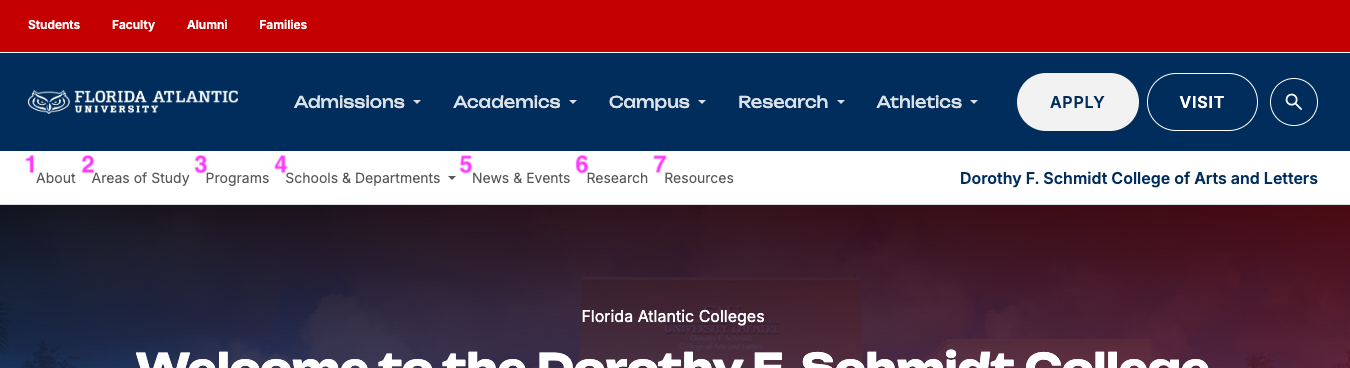
1. About
- Purpose: Institutional credibility, leadership, and external relations.
- Core Elements: Dean’s welcome, rankings and awards, accreditation, advisory board, spotlight stories, faculty and staff directory, visit/directions, alumni relations, and direct give/donate options.
2. Areas of Study
- Purpose: Topic-first academic exploration for prospective students seeking a specific discipline.
- Core Elements: Discipline overview, why study this at FAU, degree levels offered within the topic, educational objectives, student outcomes, topic-specific news, and an explicit "Apply Now" call-to-action.
3. Programs
- Purpose: Credential-first academic exploration categorized strictly by degree level.
- Core Elements: Browse offerings by Undergraduate, Graduate, Master's, Doctoral, and Certificate tracks. Clear delivery mode indicators (Online, On-Campus, or Hybrid). Note: Contains identical program data as Areas of Study, re-filtered by qualification level rather than subject matter.
4. Schools & Departments
- Purpose: Organizational homepages for individual academic units without duplicating curriculum data.
- Core Elements: Departmental mission, vision, values, chair/head welcome, specialized labs, FAQs, subset faculty/staff directories, and departmental alumni stories. Note: Links out to Programs and Areas of Study rather than hosting duplicate degree pages.
5. News & Events
- Purpose: Dynamic content hub for college-wide engagement, prospective marketing, and storytelling.
- Core Elements: Tagged news feeds (filterable by department), centralized university calendar feeds filtered to the college, podcasts, media releases, and integrated social media channels.
6. Research
- Purpose: Direct strategic elevation of FAU’s Carnegie R1 Highest Research Activity status.
- Core Elements: Active research topics, centers, institutes, specialized labs, faculty publications, scholarly journals, research-specific news, and targeted grant/giving opportunities.
7. Resources
- Purpose: Post-admissions functional hub strictly dedicated to current students, faculty, and operational needs. Zero recruitment content.
- Core Elements: Academic advising, student clubs and organizations, faculty/staff tools, internal scholarships, experiential learning/internships, college policies, downloadable forms, and administrative documents.
Side Navigation
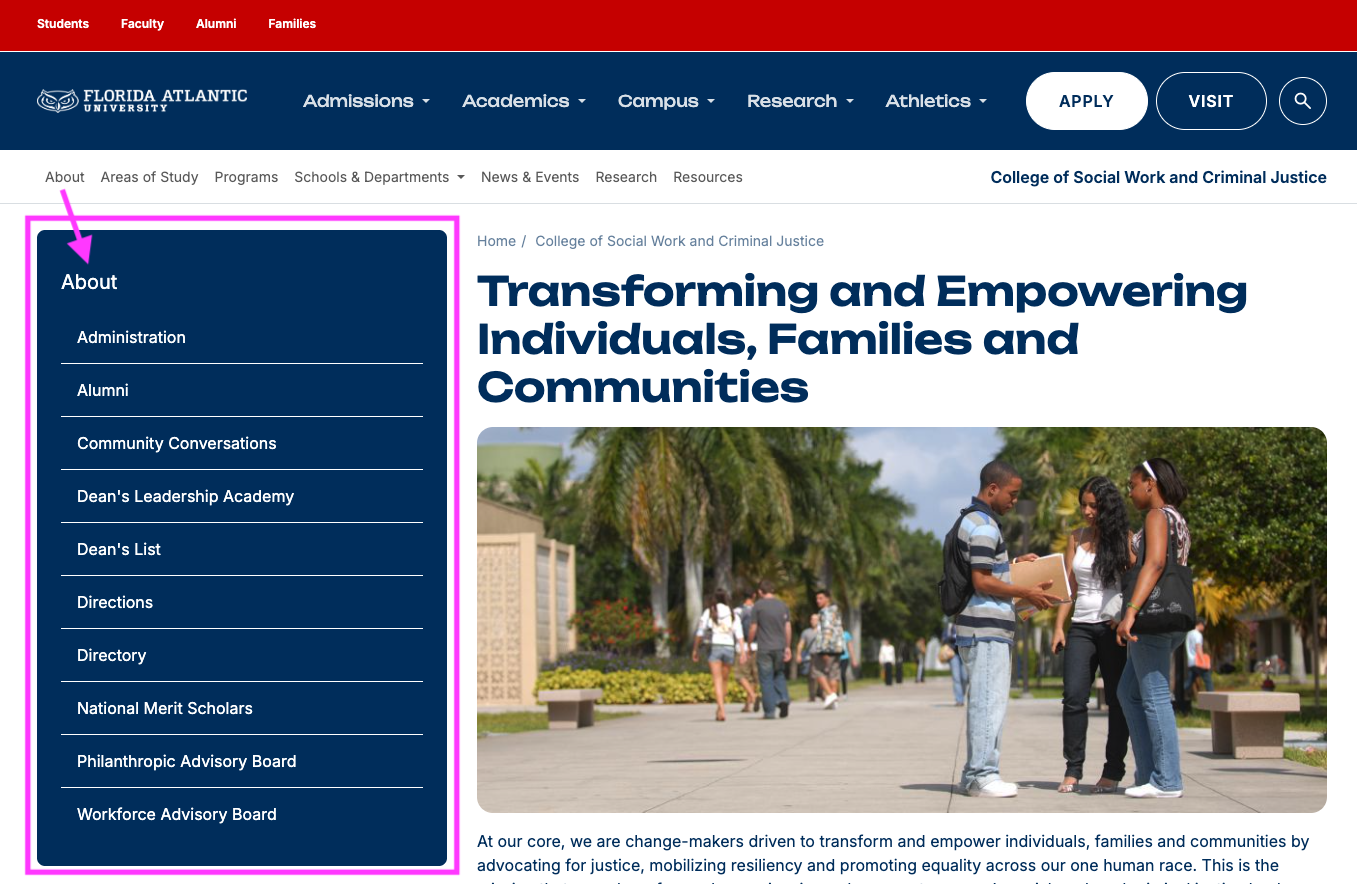
Standardized Side Navigation Architecture
The side navigation (left-hand contextual menu) provides interior page wayfinding across all FAU sites. It reinforces a streamlined taxonomy by keeping subcategory depth to a minimum, reducing click depth, and maintaining predictable navigation across deep content.
1. Display Rules & Visibility
Side navigation visibility is determined by section depth and template type:
-
Top-Level Section Landing Pages (Variable):
-
No Side Nav: High-level landing pages designed for visual discovery—specifically the main Areas of Study and Programs landing pages—do not display a side navigation bar. These pages utilize full-width grid layouts to let users filter and select their path without distraction.
-
Side Nav Present: Informational landing pages, such as the main About page, may include the side navigation directly on the root section page to provide immediate access to sub-pages like Leadership, Accreditation, or Directories.
-
-
Interior / Child Pages (Mandatory):
-
Every interior page within a section (e.g., an individual Area of Study topic page, a specific Master’s degree detail page, or a department sub-page) must display the side navigation menu.
-
2. Menu Ordering & Customization
-
Default Alphabetical Sorting: By default, all links within a side navigation block are sorted alphabetically (A to Z). This removes bias and allows users to locate specific topics, degree options, or departments scanning predictably.
-
Strategic Reordering (Optional): Content managers have the editorial authority to override the default alphabetical sort. High-priority items (e.g., urgent deadlines, flagship programs, or top-tier resources) may be pinned to the top of the side menu when business goals require higher visibility.
3. Structural Hierarchy & Taxonomy Rules
To protect the simplified site architecture and avoid deep, buried content:
-
Flat Hierarchy Limit: Side navigation is restricted to a maximum of two levels (Parent item and one indented Sub-item level).
-
No Deep Nesting: Deeper nested levels (3+ levels down) are strictly disabled to prevent "accordion creep" and excessive mobile scrolling. Content requiring further breakdown must be handled via on-page UI elements (such as tabbed interfaces, anchor links, or accordions) rather than adding side menu layers.
-
Contextual Persistence: The side navigation remains consistent within its parent section so users always understand where they are within the broader college framework.
Side Navigation: Best Practices, Tips, & Strategic Tensions
To maintain a predictable user experience across all FAU college sites, the side navigation (the dark blue block) follows strict directional rules. These guidelines govern how internal link hierarchy, breadcrumb trails, and external/cross-section links interact.
1. Scope & Directional Flow (The "Down & In" Rule)
-
Strict Directory Boundaries: The dark blue side navigation block must only link to pages located within that specific directory or its sub-directories. It must never link "up" to parent sections outside its path or "out" to external websites or separate college divisions.
-
Linking Out via In-Page Components: When a page needs to direct users to an external site or a different section of the university website:
-
Cards with Icons: Use page body cards (specifically Cards with Icons) to highlight related off-site content, partner divisions, or external portals.
-
Action Buttons: Use styled buttons within the body content rather than standard text links to signal a transition away from the current section, preserving left-nav structural consistency.
-
2. Directory Governance & Orphaned Content
-
No Orphaned Pages: If a page is removed from the left side navigation, it must also be removed from the CMS directory. Do not leave unlinked ("orphaned") pages published in the Content Management System.
-
Search Indexing Risk: Orphaned pages remain indexable and will still appear in site search results, leading users to outdated, unmaintained, or inaccurate information.
-
Lifecycle Protocol: Outdated content must either be permanently deleted or set to Unpublished status. If historical preservation is necessary, apply a standard URL redirect to the nearest active parent page.
3. Wayfinding & Hierarchy Navigation
-
Breadcrumbs for Upward Traversal: Because the side navigation block strictly links deeper into a section, users rely on Breadcrumbs to move back up the directory hierarchy.
Breadcrumbs
-
Breadcrumb labels default to Title Case.
-
When adding new sub-sections or renaming existing pages, content managers must manually verify that the breadcrumb trail accurately reflects the updated directory titles.