Centralized FAQ System Strategy & Technical Guidelines
To ensure absolute content accuracy and maximize digital visibility, Florida Atlantic University has replaced all static, decentralized FAQ pages with a unified Centralized FAQ Engine.
This system addresses two critical challenges: eliminating out-of-sync information across campus sites and optimizing FAU's content for AI-driven search engines.
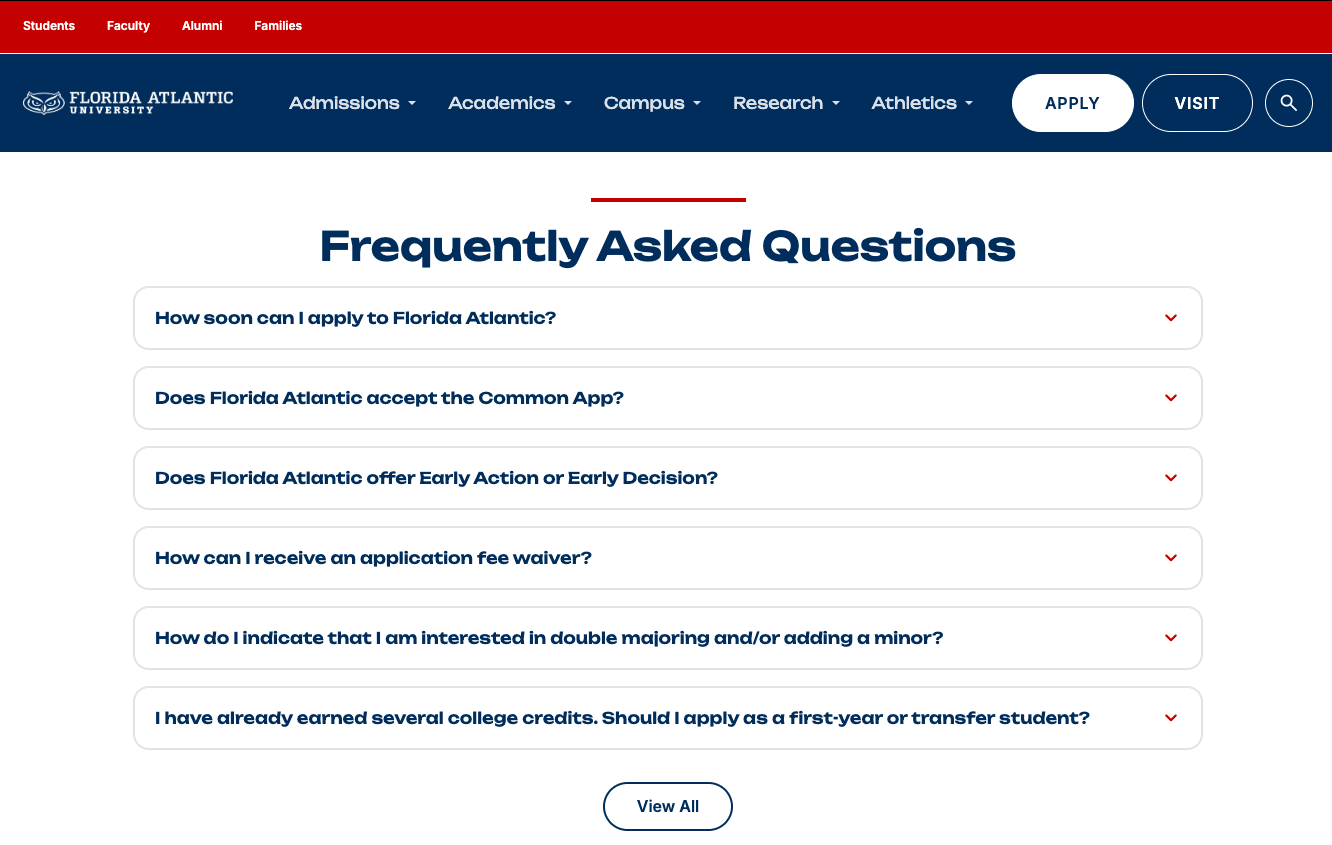
1. Centralized Management & Single Source of Truth
In legacy implementations, identical questions (e.g., “How do I apply for an assistantship?” or “What are the admission deadlines?”) were manually copy-pasted across multiple department, college, and administrative pages. When policies changed, updating one page left dozens of others outdated, leading to conflicting instructions for students.
-
Single-Database Architecture: All FAQs are created, edited, and stored in a single, centralized database.
-
Tag-Based Distribution: FAQs are assigned specific metadata tags (e.g.,
tag: Financial Aid,tag: College of Business,tag: Graduate Admissions). -
Dynamic Placement: Site managers embed an FAQ Component on any page, identifyign the proper JSON file based on name. The JSON file automatically pulls the latest questions directly from the central database.
-
Instant System-Wide Updates: When an FAQ is updated in the central database, that change instantly propagates to every page across the entire university web ecosystem where that FAQ is embedded.
2. Structured JSON Output & Google AI Overview Optimization
Search engines heavily prioritize structured data when assembling conversational, generative search results.
-
Structured Data Output: The FAQ engine automatically outputs all question-and-answer pairs using standardized JSON-LD schema format.
-
Targeting Google Search Summaries (AI Overviews): Google’s top-of-page AI summaries synthesize answers from three primary cited sources. By delivering machine-readable JSON-LD directly to web crawlers, FAU’s content becomes significantly easier for Google’s search algorithms to parse, evaluate, and cite.
-
Mitigating "Zero-Click" Search Trends: Generative search summaries often answer user queries directly on the search results page, reducing traditional web traffic across the internet. Securing one of the three featured citation slots in Google’s AI summary ensures FAU remains the authoritative source and retains maximum brand visibility.
How-To Guide: Centralized FAQ Engine
1. Requesting New, Modified, or Deleted FAQs
To maintain system integrity, schema formatting, and Google AI Overview optimization standards, all central FAQ database changes are handled centrally by the Web Development Team.
-
Submit a Ticket: Open an IT web support ticket to request new questions, content edits, or tag updates.
-
Priority: Mark your request using standard support tiers (e.g., Priority 1–3, General Question, or Idea).
-
AI Optimization Review: The Web Development Team will review and format all submitted questions and answers to ensure proper JSON-LD formatting and conversational structure before updating the database.
2. How to Embed FAQs on a Page
Content managers can place any centralized FAQ set onto a college, department, or area of study page using the standard page builder component library:
Inside the page editor, open the Component Library menu.
Search for FAQ in the component library search bar and select the FAQ Component to insert it onto your page layout.
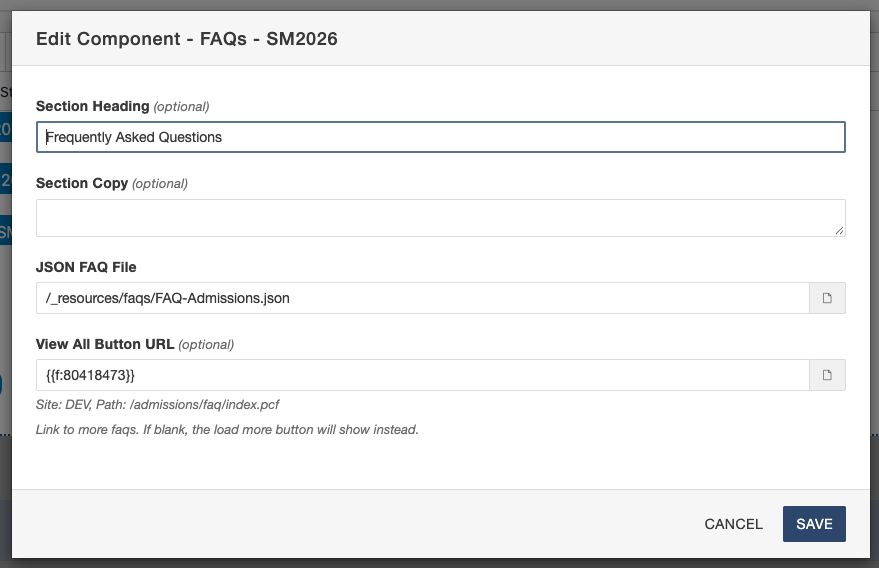
Configure the optional Title and Subhead fields directly within the component settings (e.g., Title: Frequently Asked Questions, Subhead: Admissions & Degree Requirements).
Click the Select JSON File button. A file directory modal will appear displaying all available central FAQ JSON files. Use the search bar to locate your topic by name, then click the desired JSON file to embed it.
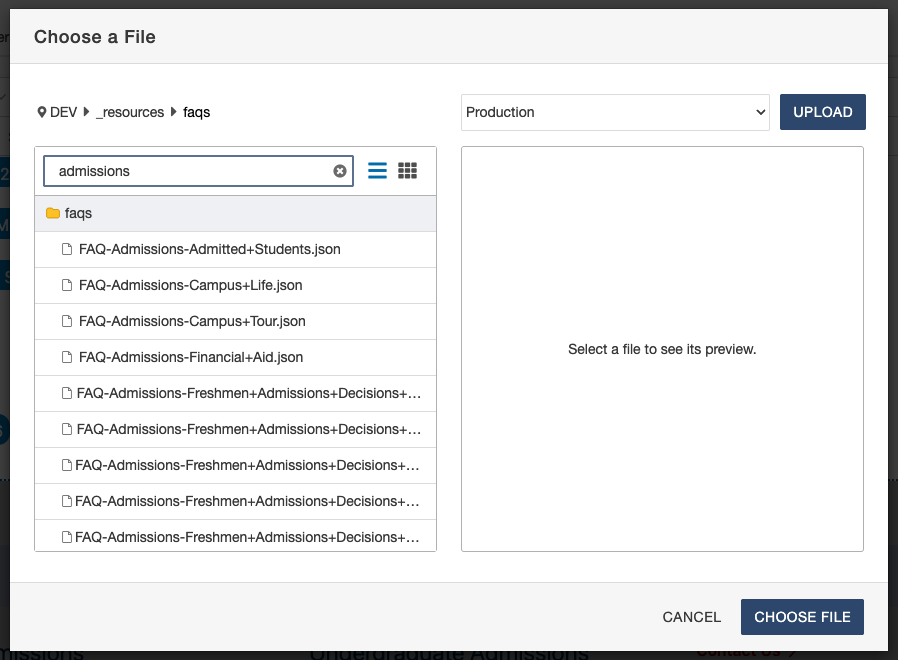
3. Display Behavior & "View More" Button Configuration
By default, the FAQ component renders the first 6 questions on the page to maintain clean vertical spacing and avoid overwhelming users with scrolling friction.
Content managers can configure the View More button using one of two functional modes based on page context:
-
Mode A: Expand in Place (For Dedicated FAQ Pages)
-
Function: Clicking "View More" expands the container div directly on the page to display all remaining FAQs in the JSON file.
-
Best Used For: Standalone, dedicated FAQ pages where comprehensive lists belong on a single landing page.
-
-
Mode B: Link to Dedicated Page (For Embedded Section Pages)
-
Function: Clicking "View More" redirects the user to a standalone, full-length FAQ page.
-
Best Used For: Contextual pages (such as Areas of Study, Programs, or Department landing pages) where you only want to highlight top questions without cluttering the core page layout.
-