CineSage: Building a Searchable Memory Pipeline for Long Video
CineSage: Building a Searchable Memory Pipeline for Long Video
Nidhi Begur, Emily Diaz-Silva, Grace Gao, Dylan Heslop, Juliette Plaisir
REU Mentor: Dr. Jason O. Hallstrom
Top right: page number 1 and the NSF Center for Smart Streetscapes logo.
Motivation
Callout box: "What if cities could tell us stories?"
- Cities are constantly producing data
- Long video footage is hard to search, summarize, and reason over manually
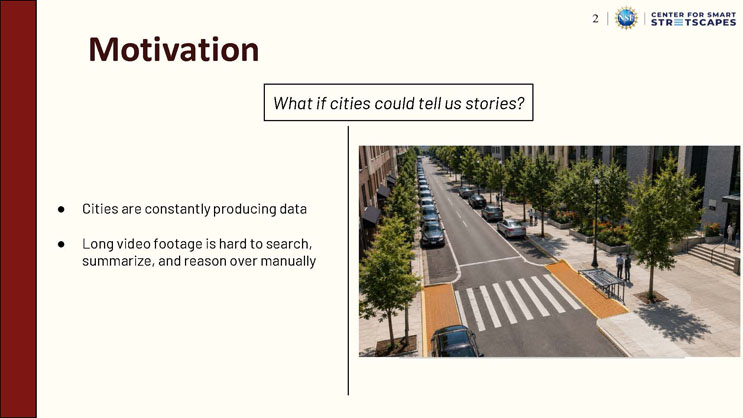
Right image: an aerial view of a city street lined with trees, parked cars, pedestrians, and a marked crosswalk with orange-tiled curb ramps.
Problem
- Scale: Cities generate large amounts of video, but most of it is hard to search manually
- Time: Current VLMs can describe short clips, but they struggle with long videos
- Bias: Many systems give answers without showing the exact evidence
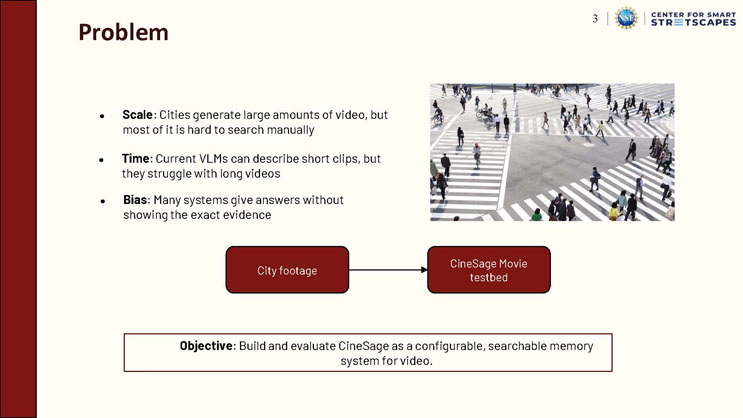
Right image: an aerial photo of a crowded pedestrian crosswalk with many people walking and biking across marked crossing lines.
Diagram: a box labeled "City footage" with an arrow pointing to a box labeled "CineSage Movie testbed."
Callout box: "Objective: Build and evaluate CineSage as a configurable, searchable memory system for video."
Model Selection Process
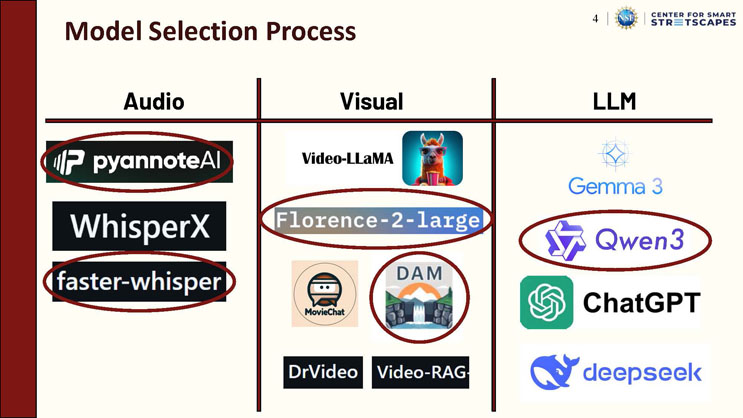
Three columns list candidate models by category, with selected models circled in red.
"Audio" column: pyannoteAI (circled/selected), WhisperX, faster-whisper (circled/selected).
"Visual" column: Video-LLaMA, Florence-2-large (circled/selected), MovieChat, DAM (circled/selected), DrVideo, Video-RAG.
"LLM" column: Gemma 3, Qwen3 (circled/selected), ChatGPT, deepseek.
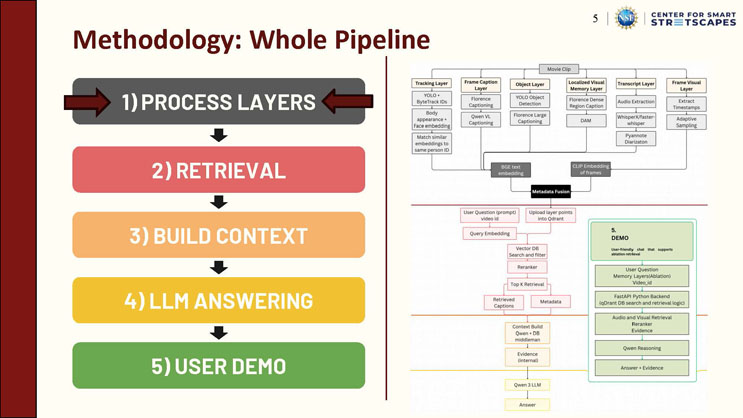
Methodology: Whole Pipeline
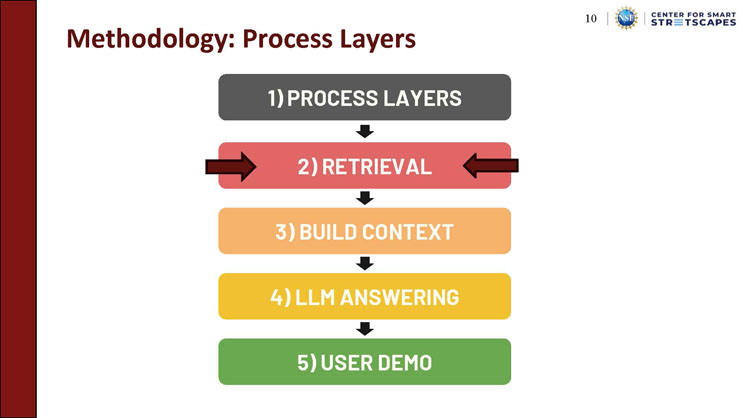
Five stacked, color-coded stages connected by downward arrows: "1) Process Layers" (gray), "2) Retrieval" (red), "3) Build Context" (orange), "4) LLM Answering" (yellow), "5) User Demo" (green).
Right side: a detailed flowchart. A "Movie Clip" feeds into six parallel processing layers: "Tracking Layer" (YOLO + ByteTrack IDs, body appearance + face embedding, match similar embeddings to same person ID), "Frame Caption Layer" (Florence Captioning, Qwen VL Captioning), "Object Layer" (YOLO Object Detection, Florence Large Captioning), "Localized Visual Memory Layer" (Florence Dense Region Caption, DAM), "Transcript Layer" (Audio Extraction, WhisperX/faster-whisper, Pyannote Diarization), and "Frame Visual Layer" (Extract Timestamps, Adaptive Sampling). These feed into a "BGE text embedding" and "CLIP Embedding of frames," which combine at a "Metadata Fusion" step. Below that, a "User Question (prompt, video id)" and "Upload layer points into Qdrant" feed into "Query Embedding," then "Vector DB Search and filter," a "Reranker," and "Top K Retrieval," producing "Retrieved Captions" and "Metadata." These feed a "Context Build (Qwen + DB middleman)" step producing "Evidence (internal)," which passes to the "Qwen 3 LLM" to produce the final "Answer." A separate green box labeled "5. DEMO" describes a "User-friendly chat that supports ablation retrieval," listing steps: User Question/Memory Layers(Ablation)/Video_id, FastAPI Python Backend (qDrant DB search and retrieval logic), Audio and Visual Retrieval/Reranker/Evidence, Qwen Reasoning, and Answer + Evidence.
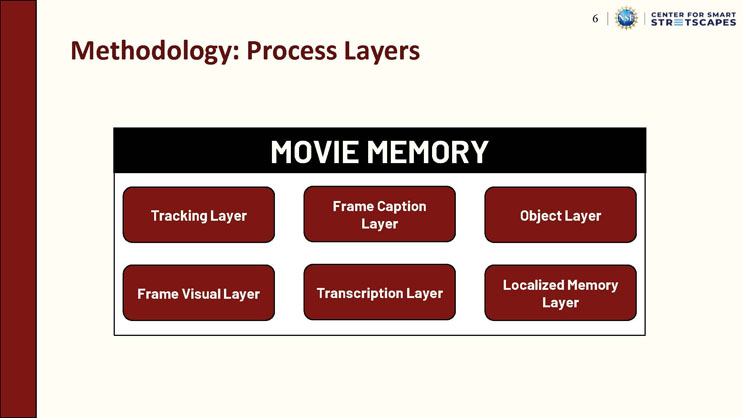
Methodology: Process Layers
Diagram titled "Movie Memory" containing six boxes arranged in a 3x2 grid: "Tracking Layer," "Frame Caption Layer," "Object Layer," "Frame Visual Layer," "Transcription Layer," and "Localized Memory Layer."
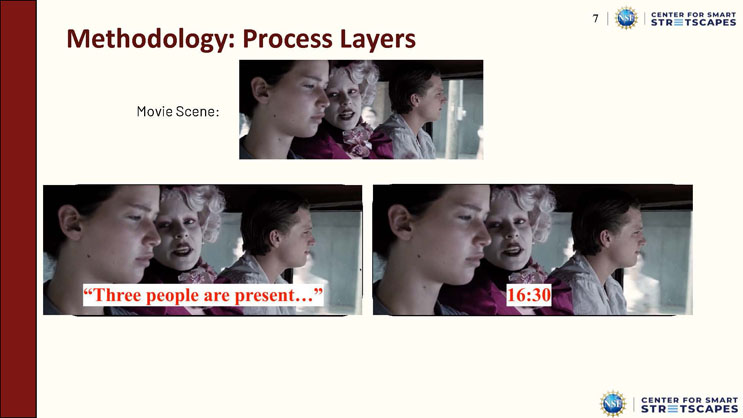
Methodology: Process Layers
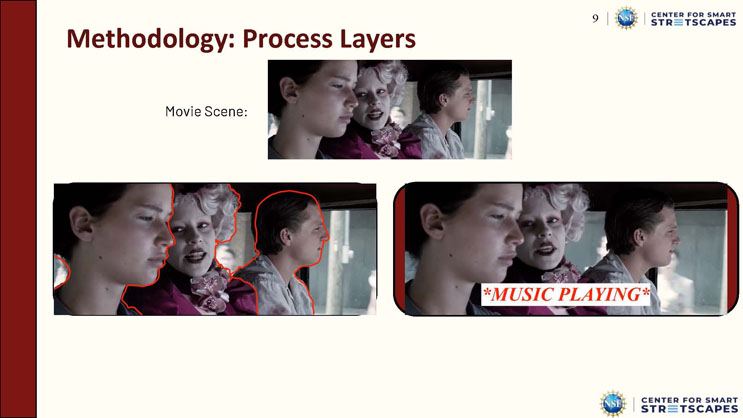
A movie scene shows three young people (two young men and a woman with elaborate white hair and makeup) sitting close together, facing sideways, apparently inside a moving vehicle.
Below, labeled "Frame Visual Layer": the same scene repeated with an overlaid caption box reading "Three people are present..."
Labeled "Frame Caption Layer": the same scene repeated with an overlaid timestamp reading "16:30."
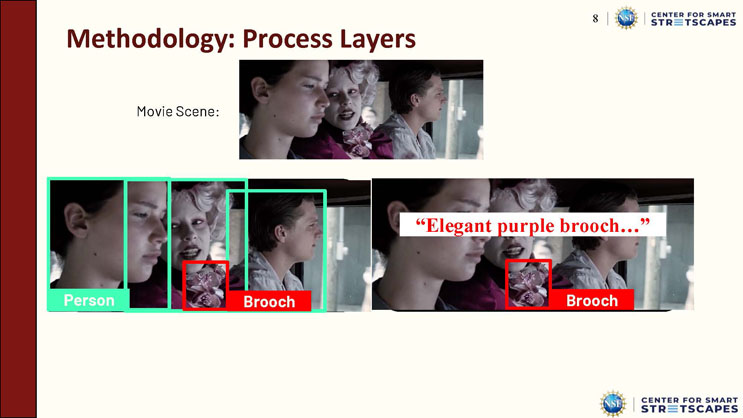
Methodology: Process Layers
The same movie scene of three people in a vehicle is shown, now with colored bounding boxes: green boxes labeled "Person" around each of the three people's heads and shoulders, and red boxes labeled "Brooch" around a decorative purple brooch worn by the woman in the middle.
Labeled "Object Layer": the boxed version of the scene.
Labeled "Localized Memory Layer": the scene repeated with only the brooch boxed in red and an overlaid caption reading "Elegant purple brooch..."
Methodology: Process Layers
The same movie scene of three people in a vehicle is shown again.
Labeled "Tracking Layer": the scene with each person's head and shoulders outlined in a red contour line, indicating tracked identities.
Labeled "Transcription Layer": the scene with an overlaid caption reading "*MUSIC PLAYING*", indicating a transcribed audio event.
Methodology: Process Layers
Five stacked, color-coded pipeline stages connected by downward arrows: "1) Process Layers" (gray), "2) Retrieval" (red, with arrows pointing in from both sides to emphasize this stage), "3) Build Context" (orange), "4) LLM Answering" (yellow), "5) User Demo" (green).
Methodology: Retrieval
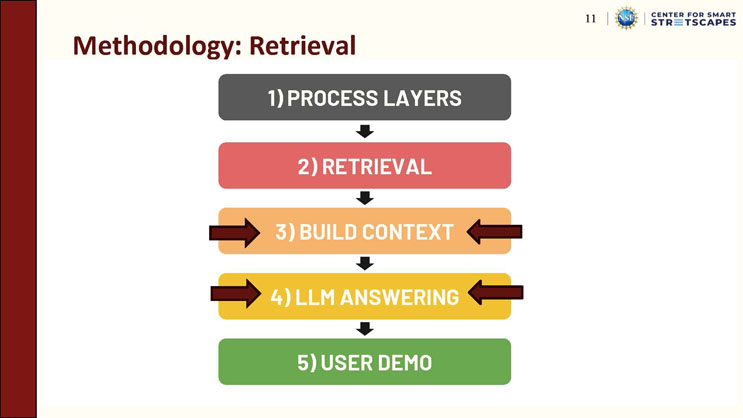
Retrieval steps listed: "User prompt and Query Embedding," "Upload memory layers into Qdrant," "Search vector DB with Reranker," "Retrieve Top K relevant evidence."
Five stacked, color-coded pipeline stages connected by downward arrows: "1) Process Layers" (gray), "2) Retrieval" (red), "3) Build Context" (orange, with arrows pointing in from both sides), "4) LLM Answering" (yellow, with arrows pointing in from both sides), "5) User Demo" (green).
Methodology: Context + Answer
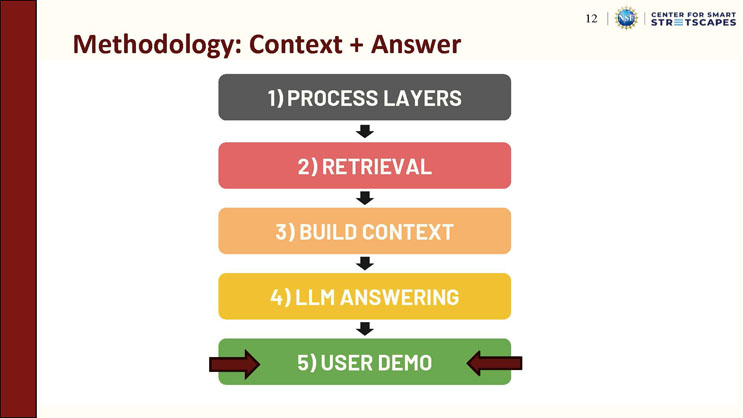
Labels: "Context Builder" and "Final Answer," with a note that evidence and the prompt are passed to the LLM.
Five stacked, color-coded pipeline stages connected by downward arrows: "1) Process Layers" (gray), "2) Retrieval" (red), "3) Build Context" (orange), "4) LLM Answering" (yellow), "5) User Demo" (green, with arrows pointing in from both sides to emphasize this stage).
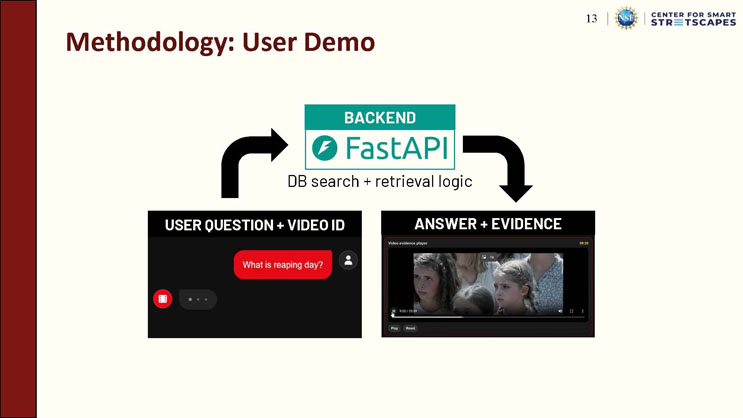
Methodology: User Demo
Diagram: a "Backend" box labeled "FastAPI," described as handling "DB search + retrieval logic." Arrows show a "User Question + Video ID" input flowing into the backend, and an "Answer + Evidence" output flowing out.
Left screenshot, labeled "User Question + Video ID": a dark-themed chat interface showing a user message bubble reading "What is reaping day?"
Right screenshot, labeled "Answer + Evidence": a video evidence player interface showing a paused frame of three women, with a progress bar reading "9:20 / 25:59" and playback controls including Play and Reset buttons.
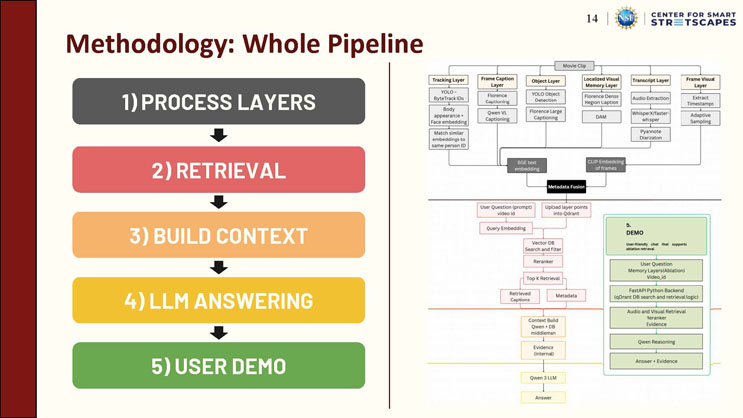
Methodology: Whole Pipeline
This slide repeats the same five-stage overview ("1) Process Layers," "2) Retrieval," "3) Build Context," "4) LLM Answering," "5) User Demo") and the same detailed flowchart of the movie clip processing layers, metadata fusion, retrieval pipeline, context building, LLM answering, and the demo interface described on the earlier "Methodology: Whole Pipeline" slide.
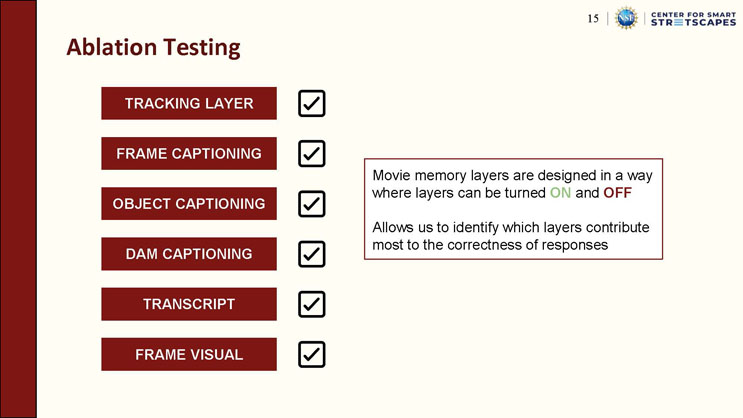
Ablation Testing
Six layer labels, each shown with a checked checkbox: "Tracking Layer," "Frame Captioning," "Object Captioning," "DAM Captioning," "Transcript," "Frame Visual."
Callout box: "Movie memory layers are designed in a way where layers can be turned ON and OFF. Allows us to identify which layers contribute most to the correctness of responses."
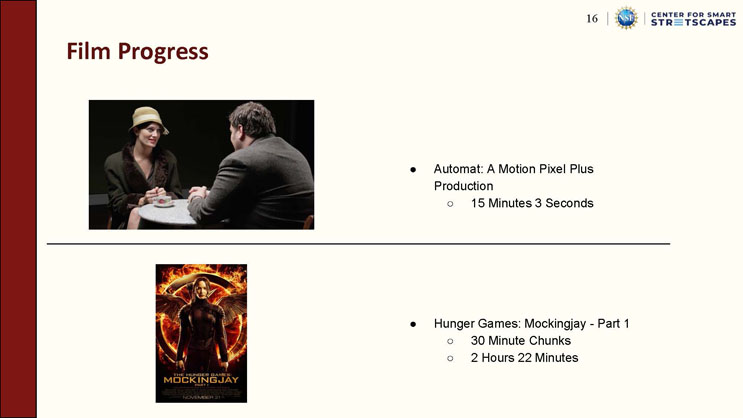
Film Progress
- Automat: A Motion Pixel Plus Production
- 15 Minutes 3 Seconds
- Hunger Games: Mockingjay - Part 1
- 30 Minute Chunks
- 2 Hours 22 Minutes
Top image: a still frame from "Automat" showing a woman in a hat and a man seated at a small café table.
Bottom image: the movie poster for "The Hunger Games: Mockingjay - Part 1," showing a woman's silhouette within a flaming mockingjay emblem.
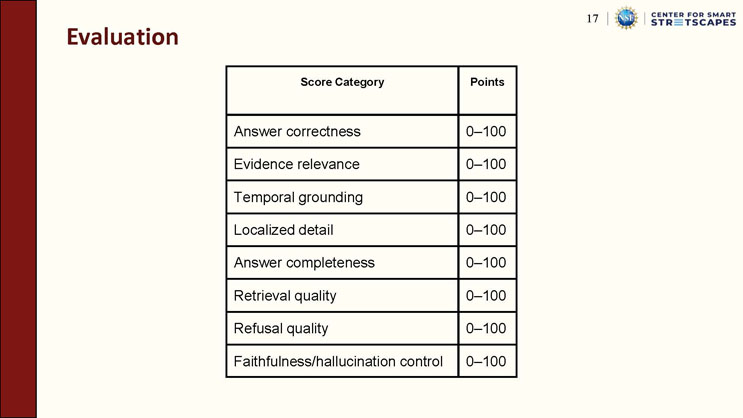
Evaluation
| Score Category | Points |
|---|---|
| Answer correctness | 0-100 |
| Evidence relevance | 0-100 |
| Temporal grounding | 0-100 |
| Localized detail | 0-100 |
| Answer completeness | 0-100 |
| Retrieval quality | 0-100 |
| Refusal quality | 0-100 |
| Faithfulness/hallucination control | 0-100 |
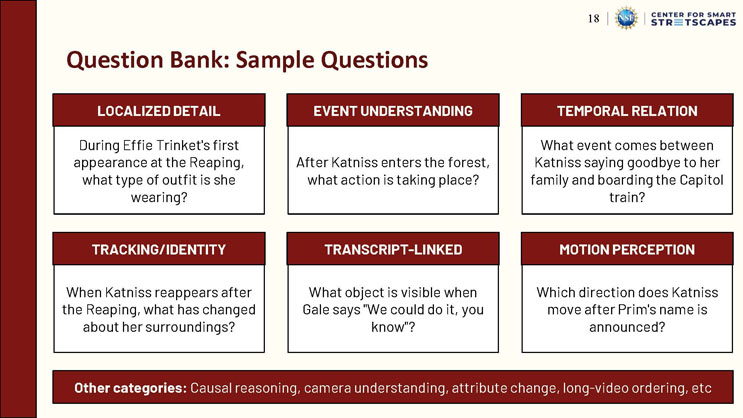
Question Bank: Sample Questions
Localized Detail: During Effie Trinket's first appearance at the Reaping, what type of outfit is she wearing?
Event Understanding: After Katniss enters the forest, what action is taking place?
Temporal Relation: What event comes between Katniss saying goodbye to her family and boarding the Capitol train?
Tracking/Identity: When Katniss reappears after the Reaping, what has changed about her surroundings?
Transcript-Linked: What object is visible when Gale says "We could do it, you know"?
Motion Perception: Which direction does Katniss move after Prim's name is announced?
Other categories: Causal reasoning, camera understanding, attribute change, long-video ordering, etc.
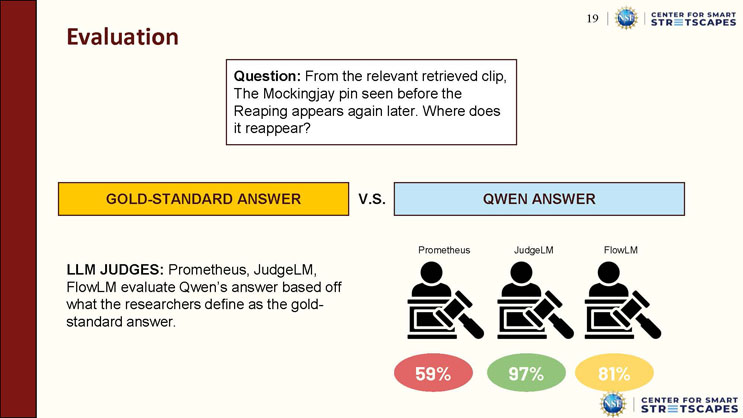
Evaluation
Question: From the relevant retrieved clip, the Mockingjay pin seen before the Reaping appears again later. Where does it reappear?
A comparison box shows "Gold-Standard Answer" versus "Qwen Answer."
Text: "LLM Judges: Prometheus, JudgeLM, FlowLM evaluate Qwen's answer based off what the researchers define as the gold-standard answer."
Three judge icons with scores: Prometheus 59%, JudgeLM 97%, FlowLM 81%.
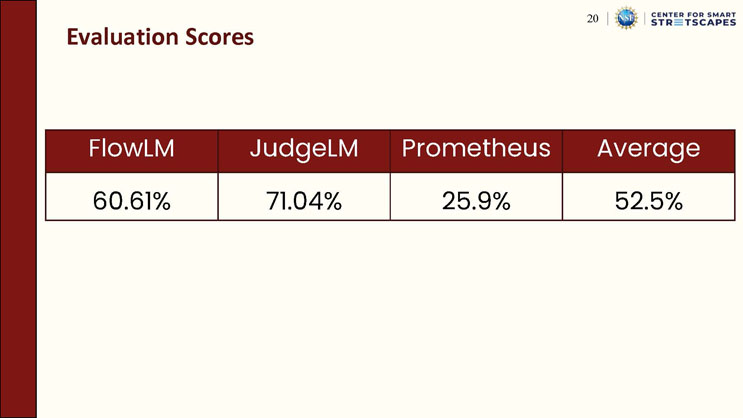
Evaluation Scores
| FlowLM | JudgeLM | Prometheus | Average |
|---|---|---|---|
| 60.61% | 71.04% | 25.9% | 52.5% |
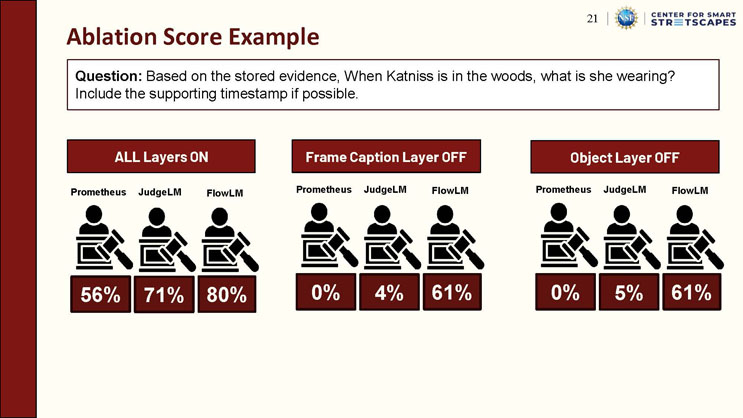
Ablation Score Example
Question: Based on the stored evidence, when Katniss is in the woods, what is she wearing? Include the supporting timestamp if possible.
"ALL Layers ON" condition: Prometheus 56%, JudgeLM 71%, FlowLM 80%.
"Frame Caption Layer OFF" condition: Prometheus 0%, JudgeLM 4%, FlowLM 61%.
"Object Layer OFF" condition: Prometheus 0%, JudgeLM 5%, FlowLM 61%.

Video Demo
A simple section divider slide with the centered text "VIDEO DEMO."
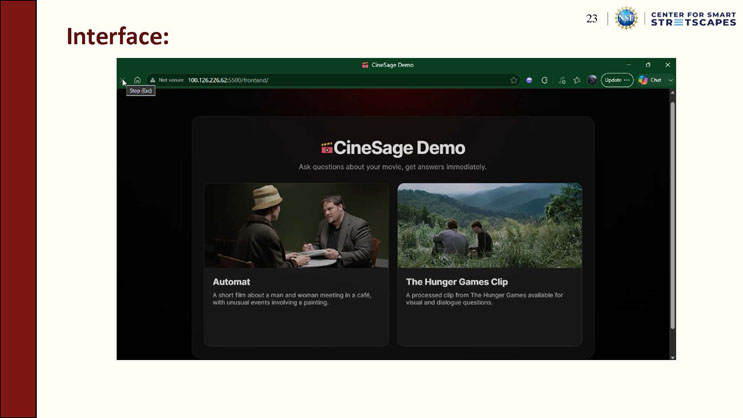
Interface:
Screenshot of a web browser showing the "CineSage Demo" application, with the heading "Ask questions about your movie, get answers immediately." Two movie selection cards are shown: "Automat," described as "A short film about a man and woman meeting in a café, with unusual events involving a painting," and "The Hunger Games Clip," described as "A processed clip from The Hunger Games available for visual and dialogue questions."
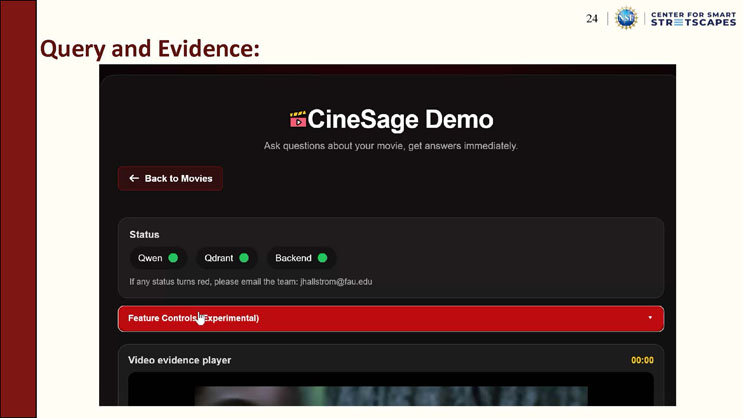
Query and Evidence:
Screenshot of the CineSage Demo interface showing a "Back to Movies" button, a "Status" panel with green indicators for "Qwen," "Qdrant," and "Backend," and a note: "If any status turns red, please email the team: jhallstrom@fau.edu." Below is a collapsed red "Feature Controls (Experimental)" panel and the top of a "Video evidence player" section showing a timestamp of 00:00.
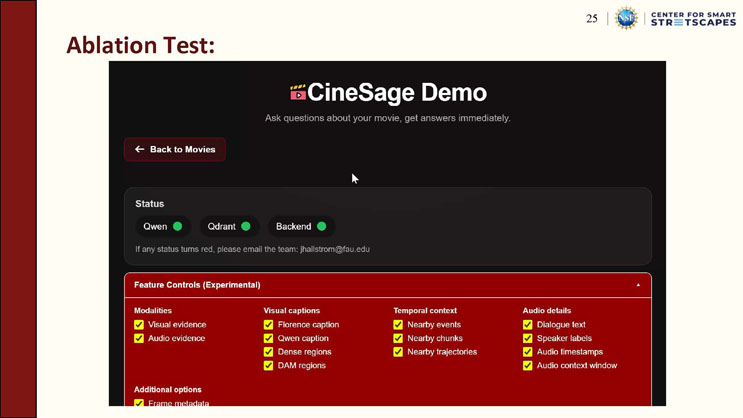
Ablation Test:
Screenshot of the CineSage Demo interface with the "Feature Controls (Experimental)" panel expanded, showing checked checkboxes grouped into four columns: "Modalities" (Visual evidence, Audio evidence), "Visual captions" (Florence caption, Qwen caption, Dense regions, DAM regions), "Temporal context" (Nearby events, Nearby chunks, Nearby trajectories), and "Audio details" (Dialogue text, Speaker labels, Audio timestamps, Audio context window). An "Additional options" section begins below with a checked "Frame metadata" option.
Placeholder
[Placeholder: The content of this page could not be processed. This appears to fall between the "Ablation Test" screenshot slide and the "Judge Evaluation" slide, and may be a continuation screenshot or transitional slide. Please review the source PDF page directly and supply a description.]
Judge Evaluation:
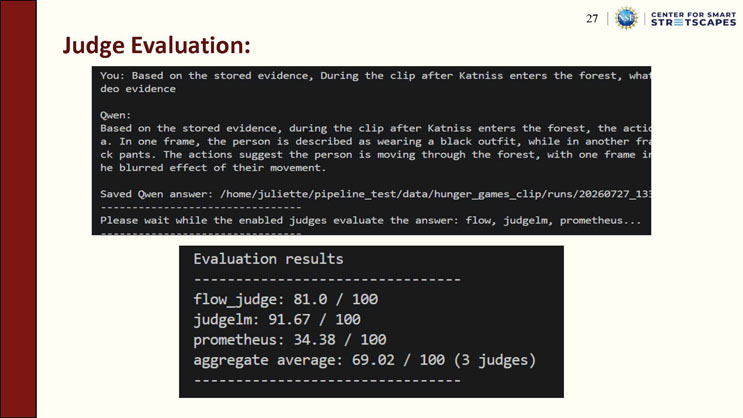
Terminal screenshot showing a user query: "Based on the stored evidence, During the clip after Katniss enters the forest, what [is happening], using video evidence." The model "Qwen" responds with an answer describing that during the clip after Katniss enters the forest, the action shows a person, in one frame described as wearing a black outfit, and in another frame black pants, with the actions suggesting the person is moving through the forest, including a blurred effect indicating movement. Below, the terminal shows "Saved Qwen answer" with a file path, followed by "Please wait while the enabled judges evaluate the answer: flow, judgelm, prometheus..."
A second terminal panel, titled "Evaluation results," lists: "flow_judge: 81.0 / 100," "judgelm: 91.67 / 100," "prometheus: 34.38 / 100," and "aggregate average: 69.02 / 100 (3 judges)."

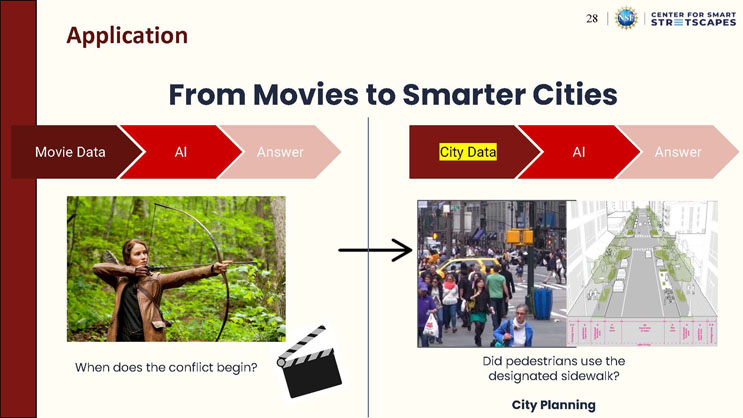
Application: From Movies to Smarter Cities
Two parallel flow diagrams, each showing "[Data] → AI → Answer."
Left side: "Movie Data → AI → Answer," illustrated with a photo of a woman aiming a bow and arrow in a forest, captioned "When does the conflict begin?" with a film clapperboard icon.
Right side: "City Data → AI → Answer," with "City Data" highlighted in yellow, illustrated with a photo of a crowded urban sidewalk next to an architectural rendering of a tree-lined street, captioned "Did pedestrians use the designated sidewalk?" and labeled "City Planning."
Acknowledgements
This work was supported through the NSF REU Site in Sensing and Smart Systems, funded through NSF Award CNS-2447437.
This work was supported through the NSF Engineering Research Center for Smart Streetscapes (CS3), funded through NSF Cooperative Agreement EEC-2133516.
Logos shown: Center for Smart Streetscapes, the National Science Foundation, and Florida Atlantic University I-SENSE: The Institute for Smarter Cities, Spaces, and Health.
End of Presentation
Click the right arrow to return to the beginning of the slide show.
For a downloadable version of this presentation, email: I-SENSE@FAU.